See below the fixed bugs in the Certificate Manager version running on Cryptographic Security Platform 1.1.0.
- Matching tags not sorted (ATEAM-18116)
- 502 status code when selecting Preview CSV for a report (ATEAM-18121)
- Missing keyboard accessibility options (ATEAM-18302)
- Mandatory fields not validated (ATEAM-18315)
- No charts dislayed on widgets (ATEAM-18328)
- Shared partitions not supported on path (ATEAM-18348)
- Certificate autorenewal cannot be disabled (ATEAM-18470)
- Multiple DNS in SAN not supported (ATEAM-18674)
- Authentication error in the user console (ATEAM-18726)
- Manual upgrade required for supporting Sectigo CA (ATEAM-18790)
- "Weak Hash Algorithm" filter requires resetting before generating a report (ATEAM-18804)
Matching tags not sorted (ATEAM-18116)
When typing a tag name, the Authorized Tag field does not display a sorted list of the matching tags.
502 status code when selecting Preview CSV for a report (ATEAM-18121)
Certificate Hub can return a 502 status code when exporting a report to CSV. That is, when:
- Navigating to Report / Designer.
- Selecting the Design action for a report.
- Selecting Preview CSV in the menu bar.
Workaround:
- Log in to the machine hosting the appliance or the Kubernetes deployment.
- Run the following command to edit the
acm-apiconfiguration file.sudo kubectl edit deployment/acm-api -n certhub - Add
-Xmx4gto theJAVA_OPTSsetting.env:- name: JAVA_OPTSvalue: -Xmx4g - Run the following command to make the changes effective.
sudo kubectl rollout restart deployment/acm-api -n certhub - Run the following command to edit the
schedulerconfiguration file.run ssudo kubectl edit deployment/scheduler -n certhub - Add
-Xmx4gto theJAVA_OPTSsetting.env:- name: JAVA_OPTSvalue: -Xmx4g - Run the following command to make the changes effective.
sudo kubectl rollout restart deployment/scheduler-n certhub
Missing keyboard accessibility options (ATEAM-18302)
The user cannot select a Destination using the keyboard accessibility options instead of the mouse.
Mandatory fields not validated (ATEAM-18315)
The generated public enrollment forms do not validate the mandatory fields.
No charts dislayed on widgets (ATEAM-18328)
The widgets of the Certificates page display the "NaN%" string instead of a chart.
Click >> Show Insights on the Certificates page to display the widgets.
Shared partitions not supported on path (ATEAM-18348)
Destinations of the F5-BIG-IP-Destination-Plugin type do not support shared partitions on the path.
Certificate autorenewal cannot be disabled (ATEAM-18470)
When creating a certificate, the wizard does not display the renewal options if key_client_generated is set to true in the selected profile.
Multiple DNS in SAN not supported (ATEAM-18674)
When requesting a certificate using a public enrollment form, the SAN (Subject Alternative Names) field only supports one DNS value.
Authentication error in the user console (ATEAM-18726)
After deploying Certificate Manager, the user may be unable to log in to the user console due to an authentication error.
Manual upgrade required for supporting Sectigo CA (ATEAM-18790)
Certificate Hub 4.2.0 does not support requesting certificates from a CA Gateway 3.2.0 instance integrated with a Sectigo CA.
Workaround:
- Log in to https://trustedcare.entrust.com
- Download the solutions installers with
.slnextension for:- Certificate Manager 4.2.1
- CA Gateway 3.2.1
- Copy these files to any Cryptographic Security Platform node – for example, using an SFTP client.
- Run the clusterctl solution upload to upload the solution files.
- Run the clusterctl solution deploy command to deploy the new Certificate Manager and CA Gateway versions.
"Weak Hash Algorithm" filter requires resetting before generating a report (ATEAM-18804)
When using the Preview button to export the contents of the Weak Hash Algorithm system report, the generated report file includes more certificates than just those with a weak hash algorithm.
Workaround:
- Log in to the user console of Certificate Manager.
- Navigate to Report > Designer.
- On the report grid, click on Weak Hash Algorithm.
- Display the filter menu for the Signing Algorithm column.
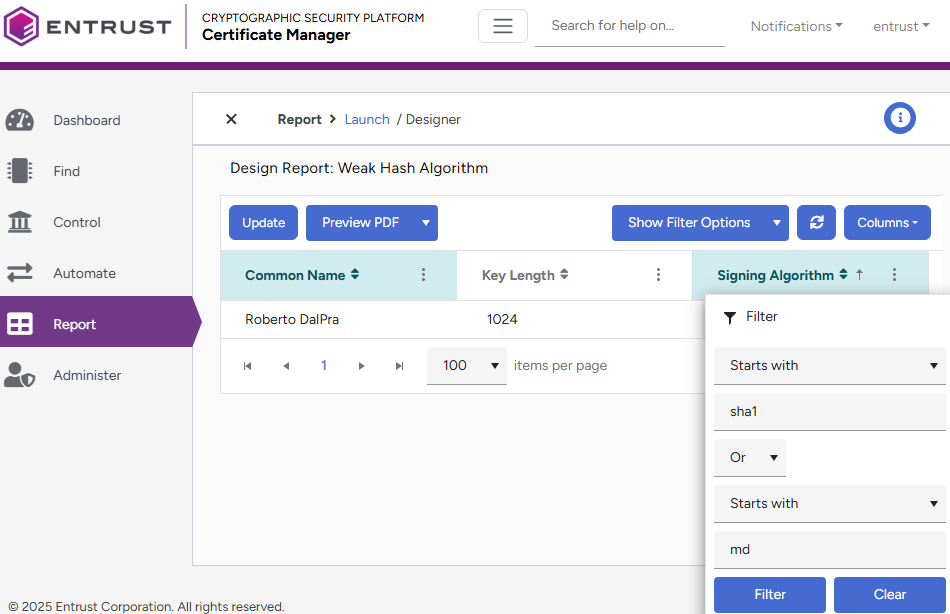
- Click Clear to remove all the filter settings.
- Click the Update button.
- Set again the initial filter configuration:
Starts with
sha1
Or
Starts with
md
- Click the Update button.
- Click Preview to confirm the generated report only includes certificates matching the filter.