f you revoke the permissions for an entire VM, all encrypted data on all the disks contained in the VM will become inaccessible until the VM is re-authenticated.
If you want to revoke individual disks within a VM, see Revoking Access to a Disk.
- Log into the Cryptographic Security Platform Vault for VM Encryption using an account with Cloud Admin privileges.
- In the top menu bar, click Workloads.
- Click the VMs tab.
- Select the VM you want to revoke in the table.
- Select Actions > Revoke Authentication.
Click Proceed at the prompt to confirm the revoke request. Cryptographic Security Platform Vault moves the VM to the Unauthenticated VMs tab and all future access requests will be denied until the VM is re-authorized. The operation is completed at the VM's next heartbeat.
After the VM heartbeat, if you enter the
hcl statuscommand on the server, the result shows that the encrypted drives have been detached and that the VM is not authenticated. For example: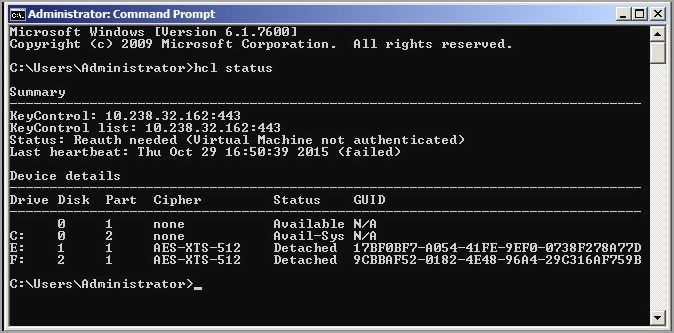
To re-authenticate the VM, see Re-Authenticating a Standard VM.