Certificate Hub 4.2.1 fixes the following bug.
502 status code when selecting Preview CSV for a report (ATEAM-18121)
Certificate Hub can return a 502 status code when exporting a report to CSV. That is, when:
- Navigating to Report / Designer.
- Selecting the Design action for a report.
- Selecting Preview CSV in the menu bar.
Workaround:
- Log in to the machine hosting the appliance or the Kubernetes deployment.
- Run the following command to edit the
acm-apiconfiguration file.sudo kubectl edit deployment/acm-api -n certhub - Add
-Xmx4gto theJAVA_OPTSsetting.env:- name: JAVA_OPTSvalue: -Xmx4g - Run the following command to make the changes effective.
sudo kubectl rollout restart deployment/acm-api -n certhub - Run the following command to edit the
schedulerconfiguration file.run ssudo kubectl edit deployment/scheduler -n certhub - Add
-Xmx4gto theJAVA_OPTSsetting.env:- name: JAVA_OPTSvalue: -Xmx4g - Run the following command to make the changes effective.
sudo kubectl rollout restart deployment/scheduler-n certhub
Sectigo CA not supported (ATEAM-18790)
Certificate Hub 4.2.0 does not support requesting certificates from a CA Gateway 3.2.0 instance integrated with a Sectigo CA.
To fix this bug, you must install Certificate Hub 4.2.1 and CA Gateway 3.2.1.
"Weak Hash Algorithm" filter requires resetting before generating a report (ATEAM-18804)
When using the Preview button to export the contents of the Weak Hash Algorithm system report, the generated report file includes more certificates than just those with a weak hash algorithm.
Workaround:
- Log in to the user console of Certificate Manager.
- Navigate to Report > Designer.
- On the report grid, click on Weak Hash Algorithm.
- Display the filter menu for the Signing Algorithm column.
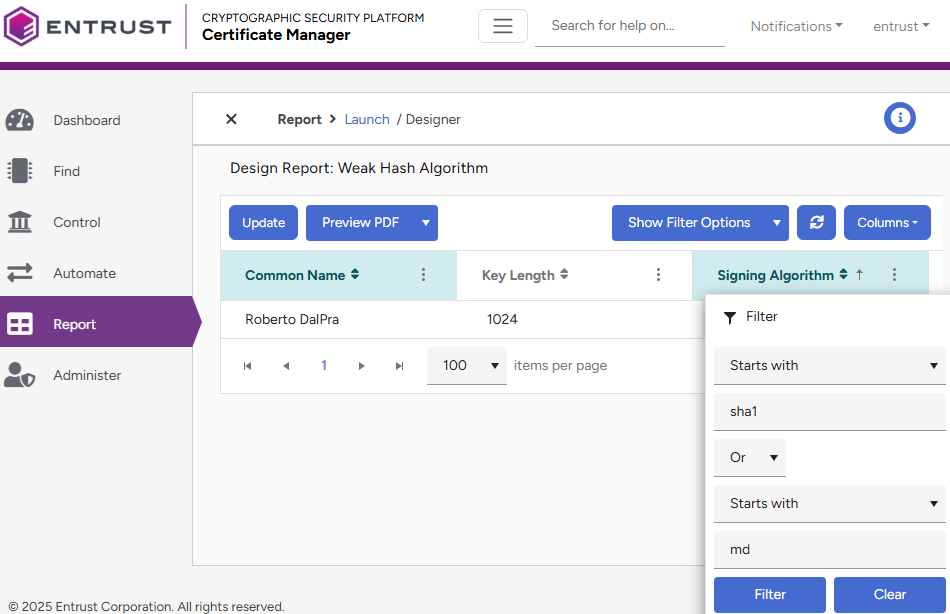
- Click Clear to remove all the filter settings.
- Click the Update button.
- Set again the initial filter configuration:
Starts with
sha1
Or
Starts with
md
- Click the Update button.
- Click Preview to confirm the generated report only includes certificates matching the filter.